Some Conventions#MagicFormat Combinations and Special CasesPreset Color CodeDonate°TextText ColorText Color Example in Normal ParagraphsText Color Example in BlockquotesText GradientGradient Text Example in Normal ParagraphsGradient Text Example in Blockquotes°ParagraphParagraph IndentationParagraph StylesParagraph ItalicParagraph BoldParagraph UnderlineParagraph Highlight°TableCell MergingTable Column FormattingBasicMore Basic Column Formatting ExamplesNumericCheckboxFreeze Table ColumnFreeze Table RowCell ColoringTable Row Grouping & FoldingTable Wrapping LayoutTable AlignmentTable Caption & Auto-numberingTable Summary Row and Column Style°ImageImage Display LayoutIcon Layout ExamplesLogo Layout ExamplesSpecified as logo modeSpecified as #logo#left modeSpecified as #logo#right modeImage ScaleWidth Scaling by Percentage ExamplesWidth Scaling by Pixels ExamplesHeight Scaling by Pixels ExamplesImage RotationImage Rotation ExampleImage FlipImage Flipping ExampleImage FilterImage Filter ExamplesHover to Restore Original ExamplesImage Grid BackgroundLine Grid Background ExamplesBlock Grid Background ExamplesImage Edge PaddingPostcardAdding Postcard to Any Ordinary Image (Single Card) ExampleAdding Postcard to Any Ordinary Image (Single Card+Border) ExampleAdding Postcard to Any Ordinary Image (Dual Card) ExampleAdding Postcard to Any Ordinary Image (Dual Card+Border) ExamplePostcard with Blockquote Coloring (Dual Card) ExampleSingle Card Example with Blockquote ColumnsFlat Mode Example with Blockquote ColumnsImage HD Screen AdaptationImage Adaptation for Dark ModeInvert Color AdaptationReplacement AdaptationImage SilhouetteImage Silhouette Mixed Layout ExampleBlockquote Coloring and Title ExampleGIF Playback ControlImage ComparisonImage GalleryImage AlignmentImage Caption & Auto-numbering°ListList Auto-numbering & StyleList ColumnsTask List Style°BlockquotesBlockquote SubtitleExample Effect Below:Blockquote ColumnsBlockquote ColoringBlockquote FoldingPractical Application ExampleBlockquote Typesetting SubdivisionExample of Nested Blockquotes in BlockquotesExample of Column Blockquotes Nested in BlockquotesExample of Blockquotes Nested in Lists°Chapter HeadingsHeading StyleAutomatic Heading NumberingThis is a level 2 heading exampleThis is a level 3 heading exampleThis is a level 4 heading exampleThis is a level 5 heading exampleThis is a level 6 heading example
Select language ❯ 🇨🇳 简体中文
Some Conventions
#Magic
#MagicCyOgPu, pronounced as /sharp magic/
What is "#Magic"?
After multiple iterations and user feedback, VLOOK™ has explored practical and elegant methods for quick image and video typesetting.
We can activate corresponding typesetting "magic" by adding URL anchors at the end of image or video addresses~
The usage method is by adding URL anchors "#specific magic" at the end of image paths
Example:
Images in Markdown are generally in this format:
If we want to set the image as an icon style, we can add
#iconto scale to 200px width, we can add#200w~
Quick Typesetting Applications for Images
Display Layout, Scaling, Filter, Grid Background, Edge Padding, etc.~
Quick Typesetting Applications for Videos
Embedded videos from streaming platforms, specified as "Vertical Display", etc.
Format Combinations and Special Cases
VLOOK™ combines and specially uses conventional Markdown formats to innovatively achieve various personalized and practical typesetting capabilities.
tab
Highlight
The highlight color will adapt based on Theme Color, Text Color, Text Gradient, Blockquote Coloring, GitHub Style Alert.
Level 1 Heading, Level 6 Heading
Using Markdown's level 1 heading
# Headingand level 6 heading###### Headingin specific positions in the document achieves:
Markdown Conventional Format Combinations
| Markdown Format Combinations | Implemented New Typesetting Features |
|---|---|
*`Tag`* | "Tags" |
*==Caption==* when occupying a single line | "Table Caption" "Image Caption" "Code Block Caption" "Multimedia Content Caption" |
*==Breadcrumbs==* when not occupying a single line | "Breadcrumbs" |
[<kbd>Button Link</kbd>](url) | "Button Links" |
**==Progress Bar==** | "Progress Bars" |
*Hint**Scratch Card*** | "Scratch Card" |
_~Color Code~_ ⓘ | "Text Color" "Text Gradient" "Colorful Tags" "Cell Coloring" "Scratch Card" "Blockquote Coloring" |
_^Tab Group^_ or *^Tab Group^* when occupying a single line | "Tab Group" |
_^Phonetic Notation^_ or *^Phonetic Notation^*when not occupying a single line | "Phonetic Notation" |
Preset Color Code
< One >
Below are VLOOK™'s predefined color codes, where the two-character English abbreviations are color code markers, such as:
YeAqT1, etc.
< Two >
Will be used in subsequent Text Color, Text Gradient, Cell Coloring, Tags, Scratch Card, Blockquote Coloring, etc.
< Three >
Supports "Regular" and "Emphasized" styles. Adding an English exclamation mark "!" after the color code specifies the emphasized style, e.g.:
Ye!

Syntax
Set the "Color Code" to the following format combination: first "Italic", then "Subscript"
Corresponding Markdown format syntax:
Single color:
_~Color Code~_, e.g.:_~Ye~__~Aq~__~T1~_Gradient color:
_~Color Code 1Color Code 2...Color Code n~_, e.g.:_~YeOg~__~RdGnBuRo~_After correctly setting the format combination, a special style will be displayed as a hint during editing (or after gaining focus), and it will take effect only after exporting the HTML file.
Important
To distinguish from Typora's default italic marked with single asterisks *italic*, and to resolve conflicts with bold, the italic in color codes must use Markdown's other italic mark syntax (underscore _).
Donate
Thanks to the patrons who donated to support VLOOK™ (partial list) / Thanks for donate VLOOK™ (partial donors)
PeterPuOgRd、绿邃清幽CyBuAq、李导996CyBuAq、fankyCyBuAq、*丽CyBuAq、杨琛CyBuAq、*哦GnBn、*豫GnBn、l*aGnBn、*oGnBn、C*r、ocean、swingingroi、*胡、K*y、行川、*药、*山、*魂、*士、*狗、*R、*Z、*川、l*n、*朽、*杰、A*C、W*l、*山、J*o、韩宗辉、*星、一叶知秋、d*、*军、*鹏、*无、H*t、*二、*宇、*辉、*秋、*笑、*心、整*9、*国、*哥、乌拉、*龙、远方眼前、*雩、*应、*销、E*y、…
Your coffee ☕️ keeps VLOOK™ running
Se

Your coffee ☕️ keeps VLOOK™ running
Gn

°Text
Text Color
Markdown FansQ「Specifying different colors for text is probably the second most requested feature by Markdown fans after table typesetting!」
VLOOKAT2 achieves this easily through a concise method, let's take a look~
Availability •••
Editing× Not SupportedGyExport HTML✓ SupportedGn
How to Make Your Markdown Document Text Colors More Vibrant (Bilibili)
tab
Text Color for "Specified Format"
Add predefined color codes after text with formats like "bold", italic, highlight, underline., e.g.: "red" by
_~Rd~_For specific color code syntax, refer to Preset Color Code
Text Color for "Entire Paragraph"
The syntax is consistent with the left "Text Color for Specified Format", the difference is adding Preset Color Code at the very beginning of the paragraph. After being correctly recognized, a paragraph marker "¶T2" will appear before the color code.
Text Color Example in Normal Paragraphs
GdThis is a paragraph where you can use predefined color codes to color the entire paragraph with color codes.
Mark specified bold text contentRd in the paragraph with color code combinations, also supporting special symbols: ●Rd●Ye●Gn;
Or specified italic text contentBu with color code combinations for markingWt;
Or specified highlighted text contentRo with color code combinations for marking;
Or specified underlined text contentPu with color code combinations for marking;
Or specified^superscript content^Gn,~subscript content_Gn~_ with color code combinations for marking.
Text Color Example in Blockquotes
Apply color codes to specified bold text contentRd in the paragraph, also supporting special symbols: ●Rd●Ye●Gn;
Or apply color codes to specified italic text contentGn;
Or apply color codes to specified highlighted text contentRo;
Or apply color codes to specified underlined text contentPu.
T1This is a paragraph where you can use predefined
color codesto color the entire paragraph with color codes.
Preset Color Code and Examples for Text Color
| Color | Color Code | Single Color Rendering Example |
|---|---|---|
| Wine Red | Wn | Warning, danger, critical matters, deletionWn |
| Red | Rd | Warning, danger, critical matters, deletionRd |
| Orange | Og | Reminder, attention, fixOg |
| Yellow | Ye | Focus, optimization, memo, explanationYe |
| Lime Green | Lm | Hint, reference, additionLm |
| Green | Gn | Hint, reference, additionGn |
| Mineral Green | Mn | Hint, reference, additionMn |
| Olive Green | Ol | Hint, reference, additionOl |
| Aqua Green | Aq | Blockquote, announcementAq |
| Cyan | Cy | Blockquote, announcementCy |
| Blue | Bu | Information, newsBu |
| Sea Blue | Se | Information, newsSe |
| Lavender Purple | La | Information, newsLa |
| Vine Purple | Vn | Information, newsVn |
| Purple | Pu | Extension, expansion, reservation, backupPu |
| Rose Pink | Ro | Youthful, personality, feminineRo |
| Pink | Pk | Youthful, personality, femininePk |
| Gold | Gd | VIP, finance, engineeringGd |
| Brown | Bn | VIP, finance, engineeringBn |
| Gray | Gy | Invalid, postpone, deactivate, endGy |
| Black | Bk | Black and white, high contrastBk |
| Theme Primary Color | T1 | Current VLOOK™ theme's primary colorT1 |
| Theme Secondary Color | T2 | Current VLOOK™ theme's secondary colorT2 |
Text Gradient
Markdown FansQ「Gradient text colors are becoming increasingly popular, it would be perfect if this could be supported too!」
VLOOKAT2 The new Preset Color Code support gradient colors, with a natural and intuitive writing style that will definitely impress you~
Availability •••
Editing× Not SupportedGyExport HTML✓ SupportedGn
All rules are the same as "Text Color", just change the color code from 1 to multiple consecutive inputs~
For example: "Red-GreenRdGn" gradient is input as
_~RdGn~_, "Red-Yellow-GreenRdYeGn" gradient is input as_~RdYeGn~_For specific color code syntax, refer to Preset Color Code
Gradient Text Example in Normal Paragraphs
LmOgGnRdThis is a paragraph using predefined color codes at the very beginning to color the entire paragraph.
Mark specified bold text contentRoBuAq in the paragraph with color code combinations as gradientRoBuAq;
Or specified italic text contentOgRo with color code combinations as gradientOgWt;
Or specified highlighted text contentBuAq with color code combinations as gradientBuAq;
Or specified underlined text contentSeRo with color code combinations as gradientSeRo;
Or specified^superscript content^RdGn,~subscript content_RdGn~_ with color code combinations as gradientRdGn.
Gradient Text Example in Blockquotes
Mark specified bold text contentRoBuAq in the paragraph with color code combinations as gradientCySe;
Or specified italic text contentSeGd with color code combinations as gradientOgRo;
Or specified highlighted text contentAqPu with color code combinations as gradientBuAq;
Or specified underlined text contentOgBk with color code combinations as gradientSeRo.
LmOgGnRdThis is a paragraph using predefined color codes at the very beginning to color the entire paragraph.
For feedback: 


°Paragraph
Paragraph Indentation
Availability •••
Editing✓ SupportedGnExport HTML✓ SupportedGn
In Markdown document editing, the first-line indentation of a paragraph is usually created using the Tab key. VLOOK™ provides optimized control for Chinese environments by fixing the indentation width to the equivalent of two Chinese characters.
This is an example of paragraph indentation inside a blockquote. This is an example of paragraph indentation inside a blockquote. This is an example of paragraph indentation inside a blockquote. This is an example of paragraph indentation inside a blockquote.
Paragraph Indentation Inside a Collapsed Blockquote
This is an example of paragraph indentation inside a collapsed blockquote. This is an example of paragraph indentation inside a collapsed blockquote. This is an example of paragraph indentation inside a collapsed blockquote.
This is an example of an indented English paragraph inside a blockquote. This is an example of an indented English paragraph inside a blockquote.
Tip
You can customize paragraph indentation through Custom Theme .
Paragraph Styles
Availability •••
Editing✓ SupportedGnExport HTML✓ SupportedGn
Used to meet the need for personalized formatting of an entire paragraph, creating a differentiated style compared to regular body text.
Simply select all the content of the paragraph first, then apply the basic Markdown formatting (bold, underline, italic, highlight), such as: **entire paragraph content** ==entire paragraph content== , etc.
Paragraph Italic
Provides support for styling an entire paragraph with a distinct appearance from the main body text — typically used to de-emphasize content or format it as a reference note. Example:
~This is a paragraph that needs to be visually distinct from the main content, de-emphasized, or used as a reference note. Everything else remains unchanged.~
Italic paragraph style within blockquotes
(Currently not available)
The above is the effect after applying "paragraph Italic" to the entire paragraph. (To disable this style, simply add a space at the end)
Tip
The style of the above paragraph can be modified or disabled via the Custom Theme .
Paragraph Bold
Meets the need to center and emphasize the entire paragraph content. Example:
~This is a paragraph that needs strong emphasis, appearing in center alignment. Bold, larger font size, centered, others unchanged~
Bold paragraph style within blockquotes
(Currently not available)
The above is the effect after applying "paragraph bold" to the entire paragraph. (To disable this style, simply add a space at the end)
Tip
The style of the above paragraph can be modified or disabled via the Custom Theme .
Paragraph Underline
Meets the need to slightly emphasize the entire paragraph content, with visual separation from subsequent content but still related. Example:
~This is a paragraph with slight emphasis, visual separation from subsequent content, but still related. Larger font size, centered, others unchanged
Underline paragraph style within blockquotes
~This is a paragraph with slight emphasis, visual separation from subsequent content, but still related. Larger font size, centered, others unchanged
The above is the effect after applying "underline" to the entire paragraph. (To disable this style, simply add a space at the end)
Tip
The style of the above paragraph can be modified or disabled via the Custom Theme .
Paragraph Highlight
Meets the need for the entire paragraph content to be displayed in a more personalized, more emphasized quote style, with visual separation from preceding/following content. Example:
~This is a paragraph with more personality, more emphasisRdPuRo, visual separation from preceding/following content. Larger font size, centered, others unchanged~
Hightlight paragraph style within blockquotes
(Currently not available)
The above is the effect after applying "highlight" to the entire paragraph. (To disable this style, simply add a space at the end)
Tip
The style of the above paragraph can be modified or disabled via the Custom Theme .
For feedback:
°Table
Cell Merging
Markdown FansQ「What's the most requested feature by Markdown fans? ———— Cell merging!」
VLOOKAT2 Now you can easily achieve this — Wow! Wow!~Cheers from Markdown fans!!!
Availability •••
Editing× Not SupportedGyExport HTML✓ SupportedGn
Cross-column Merge (Horizontal Merge)
Input column merge marker
==in the cell to be merged, and this cell will merge with the adjacent cell to the left, and so on.T1
Cross-row Merge (Vertical Merge)
Input row merge marker
:in the cell to be merged, and this cell will merge with the adjacent cell above, and so on.T2
tab
Example of Normal Cell Horizontal and Vertical Merging
| Column A | Column B | Column C | Column D | Column E | Column F | Column G |
|---|---|---|---|---|---|---|
Vertical Merge ×3 | Normal Cell | Normal Cell | Normal Cell | Normal Cell | Normal Cell | 123 Vertical Merge ×5Cell Tag 1Cell Tag 2RdCell Tag 1Tag 2Gn! |
| : | Vertical Merge ×2 | Horizontal Merge ×4 | == | == | == | : |
| : | : | NormalCellbold | NormalCellTag | Normal Cell | Normal Cell | : |
| Normal Cell | Vertical Merge ×3 | Normal Cell Italic | Normal Cell | Normal Cell | Normal Cell | : |
| Normal Cell | : | NormalCellHighlight | Normal Cell | Normal Cell | Normal Cell | : |
| Normal Cell | : | NormalCellUnderline | Normal Cell | Normal Cell | Normal Cell | : |
Header Vertical and Horizontal Merge Example-1
Column A Vertical Merge ×2 | Column B Horizontal Merge ×2 | == | Column D Vertical Merge ×3 | Column E Horizontal Merge ×3 | == | == |
|---|---|---|---|---|---|---|
| : | Secondary Header | Secondary Header | : | Secondary Header E1.1 | Secondary Header | Secondary Header |
| Normal Cell | Normal Cell | Normal Cell | Normal Cell | Normal Cell | Normal Cell | Normal Cell |
| Normal Cell | Normal Cell | Normal Cell | Normal Cell | Normal Cell | Normal Cell | Normal Cell |
Header Vertical and Horizontal Merge Example-2
Column A Vertical Merge ×3 | Column B Horizontal Merge ×4 | == | == | == | Column F Vertical Merge ×3 | Column G Vertical Merge ×3 |
|---|---|---|---|---|---|---|
| : | Secondary Header B1 | == | Secondary Header B2 | == | : | : |
| : | Secondary Header B11 | Tertiary Header B12 | Tertiary Header B21 | Tertiary Header B21 | : | : |
| Normal Cell | Normal Cell | Normal Cell | Normal Cell | Normal Cell | Normal Cell | Normal Cell |
| Normal Cell | Normal Cell | Normal Cell | Normal Cell | Normal Cell | Normal Cell | Normal Cell |
Table Column Formatting
Basic
Markdown FansQ「How to quickly set whole column formatting (bold, highlight, italic) for Markdown tables?」
VLOOKAT2 SO EASY~ Just set the corresponding format in the header using standard Markdown or GFM format syntax.
Availability •••
Editing× Not SupportedGyExport HTML✓ SupportedGn
Review standard Markdown or GFM format syntax:
**bold**,*italic*,==highlight==
Basic Column Formatting Example
| Bold | Italic | Highlight | |
|---|---|---|---|
| Cell (Horizontal Merge) | == | Cell | Strikethrough Column Cell 1 |
| Cell | Cell afgiklo 10 | Cell withboldcontent | Strikethrough Column Cell 2 |
| Cell | Cell afgiklo 10 | Cell content | Strikethrough Column Cell 3 |
Note
If a column is not published to HTML, you can set the corresponding column header to strikethrough format, i.e.: ~~Column Not Published~~.
More Basic Column Formatting Examples
tab
Nested Basic Column Formatting
| Bold | Bold+Highlight |
|---|---|
| A | Cell |
| B | Cell withboldcontent |
Nested Basic Column Formatting (Multi-line Header)
| Normal Column | Nested Regular Format | == | == |
|---|---|---|---|
| : | Bold | Italic | Highlight |
| A | Cell afgiklo 10 | Cell afgiklo 10 | Cell |
| B | Cell | Cell afgiklo 10 | Cell withboldcontent |
Numeric
Markdown FansQ「Besides regular formats, are there more advanced format requirements? Numbers, percentages, currency... none can be missing!」
VLOOKAT2 Supports automatic formatting for the above numeric content across entire columns! The approach remains elegant and very VLOOK!
Availability •••
Editing× Not SupportedGyExport HTML✓ SupportedGn
Set the table column alignment to "right-align" to automatically recognize different numeric content and automatically format it!
"Normal Numbers" Auto-Formatting
Uses "DIN" style font specifically for numbers
Adds thousand separators and displays decimals in smaller font size
Automatically prefixes numbers with "plus
+" or "minus-", highlighted in different colorsRd!
Normal Numbers Example
| Original Content | Numeric Case | == | == | == | Numeric Column | |
|---|---|---|---|---|---|---|
| : | []Decimal | []Positive | []Negative | []Over 3 Digits | : | |
| 123 | 123 | |||||
| -12345 | Y | Y | -12345 | |||
| +5678.00 | Y | Y | Y | +5678.00 | ||
| -2345678.00 | Y | Y | Y | -2345678.00 |
"Percentage" Auto-Formatting
Inherits "Normal Numbers" format automatically
Displays percentage sign
%in smaller font size and visually subdued, with progress bar showing corresponding percentage valueBu!
Percentage Column Format Example
| Original Content | Numeric Case | == | == | == | Percentage Column | |
|---|---|---|---|---|---|---|
| : | []Decimal | []Positive | []Negative | []Over 3 Digits | : | |
| 79% | 79% | |||||
| 88.88% | Y | 88.88% | ||||
| +38% | Y | +38% | ||||
| -57.30% | Y | Y | -57.30% | |||
| 100% | 100% |
"Currency" Auto-Format
Inherits "Normal Numbers" format automatically
Aligns currency symbols (e.g.:
¥$), or currency abbreviations (e.g.:CNYUSDHKD, etc.) to the left and visually subdues themBn!
Important
There must be a space between the currency symbol/abbreviation and the amount value.
Currency Column Format Example
| Currency | Original Content | Numeric Case | == | == | == | Currency | |
|---|---|---|---|---|---|---|---|
| : | : | []Positive | []Negative | []Decimal | []Over 3 Digits | : | |
| RMB | ¥ +123456.99 | Y | Y | Y | ¥ +123456.99 | ||
| : | CNY 987654.99 | Y | Y | CN¥ 987654.99 | |||
| : | CNY 987654.99 | Y | Y | CNY 987654.99 | |||
| == | == | == | == | ||||
| HKD | HK$ 3456.78 | Y | Y | Y | HK$ 3456.78 | ||
| : | HKD 3456.78 | Y | Y | HKD 3456.78 | |||
| == | == | == | == | ||||
| USD | $ +555.38 | Y | Y | $ +555.38 | |||
| : | USD 555 | USD 555 | |||||
| == | == | == | == | ||||
| AUD | AU$ 56789 | Y | Y | AU$ 56789 | |||
| : | AUD -56789 | Y | Y | AUD -5678 |
Checkbox
Markdown FansQ「For table column formatting, besides typesetting formats, what if we want to support checkboxes (tick boxes)?」
VLOOKAT2 Although the requirements are higher, it can also be achieved by automatically setting the entire column to "checkbox" format!
Availability •••
Editing× Not SupportedGyExport HTML✓ SupportedGn
Add
[]before the corresponding table column header content (e.g.,[]Required Field) to automatically set the column tounselectedstate.To independently specify different states for a cell's checkbox, you can fill in the specified marker symbol at the very beginning of the cell content, such as:
State
Selected: AddYat the beginning of the cell content (case insensitive)State
Indeterminate: Add?at the beginning of the cell content (both Chinese and English question marks are supported)State
Unselected: Empty cell, or addNat the beginning of the cell content (case insensitive)
Note
If the cell has more content, separate the above symbols and content with a space.
"Checkbox" Column Format Example
| Checkbox Style | Original Content of Checkbox Column | []Checkbox Column | Description |
|---|---|---|---|
| Empty | Default to unselected | ||
| Unselected | N | n | Specified as unselected |
| : | N Text | Y Text | Specified as unselected, with description text |
| Selected | Y | y | Specified as selected |
| : | Y Text | Y Text | Specified as selected, with description text |
| No Marker Added | (N/A) | (N/A) | Default to no checkbox, and text will be distinguished by different colors |
| Indeterminate | ? When specified value >= 0 | ? When specified value >= 0 | Specified as indeterminate |
| : | ? When specified value < 0 | ? When specified value < 0 | : |
Freeze Table Column
Markdown Fan Q 「When a table contains many columns and requires horizontal scrolling, it becomes difficult to distinguish data across rows. I hope the first column can be frozen for more efficient table viewing.」
VLOOK AT2 VLOOK™ provides a way to freeze the first column of tables — and it works during editing!
Availability •••
Editing✓ SupportedGnExport to HTML✓ SupportedGn
Automatic Mode (Default)
While editing, simply set the column header of the first column to bold (see Table Column Formatting) to freeze that column.
After exporting to HTML, you can unfreeze or refreeze the first column of each table via the table’s Content Assistant.
Full-Enable Mode
All tables will have their first column frozen by default in both editing mode and exported HTML.
After exporting to HTML, you can still unfreeze or refreeze the first column of individual tables via the table's Content Assistant.
Tip
If you prefer to enable this feature selectively, or disable table column freezing by default, you can adjust it through VIP Themes.
Freeze Table Row
Important
The table header is automatically frozen during editing.
After exporting to HTML, the header will also be automatically frozen when the table is displayed in Fullscreen Mode.
Cell Coloring
Markdown FansQ「Table column formatting is rich enough, but can we use different background colors to identify individual cells?」
VLOOKAT2 VLOOK™'s Preset Color Code can be put to use again, same formula, same super easy to use!
Availability •••
Editing× Not SupportedGyExport HTML✓ SupportedGn
Color Cell Text
Consistent with the method of coloring entire paragraphs in Text Color, just add Preset Color Code at the very beginning of the cell, and a paragraph marker "¶T2" will appear before the color code after being correctly recognized, e.g.: red
_~Rd~_
Color Cell "Background"
The method is the same as cell text coloring, the difference is using "emphasized" Preset Color Code (e.g.: blue
_~Bu!~_).If "cell text" coloring has been specified, you can add it at the end positionT2
tab
Example_Cell Coloring (Single Color)
| Cell Coloring (Single Color Example)Bk! | == | == | == | == | == | == | == | == |
|---|---|---|---|---|---|---|---|---|
| T1T1 ~Theme Primary Color•Theme1_T1!~_ | / | == | == | == | == | == | == | T2T2 ~Theme Secondary Color•Theme2_T2!~_ |
| GdGd Gold•GoldGd! | PkPk Pink•PinkPk! | / | YeYe Yellow•YellowYe! | LmLm Lime•LimeLm! | AqAq Aqua•AquaAq! | / | LaLa Lavender•LavenderLa! | WtWt White•WhiteWt! |
| BnBn Brown•BrownBn! | RoRo Rose•RoseRo! | RdRd Red•RedRd! | OgOg Orange•OrangeOg! | GnGn Green•GreenGn! | CyCy Cyan•CyanCy! | BuBu Blue•BlueBu! | VnVn Vine•VineVn! | GyGy Gray•GrayGy! |
| / | PuPu Purple•PurplePu! | WnWn Wine•WineWn! | OlOl Olives•OlivesOl! | MnMn Mineral•MineralMn! | / | SeSe Sea•SeaSe! | / | BkBk Black•BlackBk! |
Example_Cell Coloring (Gradient Color)
| Cell Coloring Example (Custom Gradient Color Combination ExampleT1T2)T1T2! | == | == | == |
|---|---|---|---|
| RdSe!Red-Sea Blue Dual Gradient RdSeRdSe | OgVn!Orange-Vine Dual Gradient OgVnOgVn | YePu!Yellow-Purple Dual Gradient YePuYePu | LmRo!Lime-Rose Dual Gradient LmRoLmRo |
| GnPk!Green-Pink Dual Gradient GnPkGnPk | AqGd!Aqua-Gold Dual Gradient AqGdAqGd | CyBn!Cyan-Brown Dual Gradient CyBnCyBn | BuGy!Blue-Gray Dual Gradient BuGyBuGy |
| BkRdGnBuBn!Black-Red-Green-Blue-Brown Multi Gradient BkRdGnBuBnBkRdGnBuBn | == | == | == |
Table Row Grouping & Folding
Markdown FansQ「Table rows are all at the same hierarchical level, but what if the table data has hierarchical relationships?」
VLOOKAT2 Supports grouping and hierarchical specification for rows within tables through very concise markers.
Availability •••
Editing× Not SupportedGyExport HTML✓ SupportedGn
For subordinate rows, automatic grouping and folding can be achieved by following these rules in the first column of the table row:
Use Markdown's blockquote syntax
>␣to indicate one level of indentation, with the preceding row as the parent groupMultiple
>indicate multiple levels of indentation, e.g., three levels of indentation>>>␣Note: The
␣symbol above represents an English space
Important
The content of this cell cannot independently set formats for partial content, such as partial text bold, highlight, line breaks, etc.
tab
Writing Method as Shown in Column 2 Below
| Grouping Hierarchy | Writing Example (Note: This column should be the first column of the table in actual application) |
|---|---|
| One Level Indentation | > This is one level indentation |
| Two Levels Indentation | >> This is two levels indentation |
| Three Levels Indentation | >>> This is three levels indentation |
| T2! (More levels follow this pattern)T2 | == |
Example 1_Table Row Grouping & Folding
| Biological Classification | Column B | Column C |
|---|---|---|
| Animals | ||
| > Vertebrates | ||
| >> Mammals | ||
| >>> Humans | ||
| >> Birds | ||
| >>> Chickens | ||
| >> Fish | ||
| >>> Sea Fish | ||
| >>>> - | Salmon | Cod |
| >>>> - | Beltfish | Tuna |
| >>> Freshwater Fish | ||
| > Invertebrates | ||
| >> Insects | ||
| >>> Butterflies | ||
| >> Mollusks | ||
| >>> Octopuses | ||
| Plants | ||
| > Angiosperms | ||
| >> Dicotyledons | ||
| >>> Tomatoes | ||
| >> Monocotyledons | ||
| >>> Rice | ||
| > Gymnosperms | ||
| >> Pine Trees | ||
| Fungi | ||
| > Mushrooms | ||
| > Yeast | ||
| Bacteria | ||
| > E. coli | ||
| > Staphylococcus aureus |
Table Row Grouping & Folding Example
| Column A | []Check Column | Column B |
|---|---|---|
| Normal Row | ||
| Group 1 | ? | |
| > This belongs to Group 1 content 1.1 | Y | This row is folded |
| > This belongs to Group 1 content 1.2 | This row is folded | |
| Group 2 (with formatting) | ||
| > This belongs to continuous grouping content 2.1 | Y | This row is folded |
| > This belongs to continuous grouping content 2.2 | This row is folded | |
| > This belongs to continuous grouping content 2.3 | ? | This row is folded |
| >> This belongs to level 2 group 2.3 content 2.3.1 | This row is folded | |
| >> This belongs to level 2 group 2.3 content 2.3.2 | ? | |
| >>> This belongs to level 3 group 2.3.2 content 2.3.2.1 | Y | This row is folded |
| >>> This belongs to level 3 group 2.3.2 content 2.3.2.2 | This row is folded | |
| >>>> This belongs to group 2.3.2.2 content 2.3.2.1 | Y | This row is folded |
| >>> This belongs to level 3 group 2.3.2 content 2.3.2.3 | This row is folded | |
| > This belongs to group 2 content 2.4 | This row is folded | |
| >> This belongs to level 2 group 2.4 content 2.4.1 | This row is folded | |
| >> This belongs to level 2 group 2.4 content 2.4.2 | Y | This row is folded |
| > This belongs to group 2 content 2.5 | This row is folded | |
| > This belongs to group 2 content 2.6 | This row is folded | |
| Normal Row | Y | Cell content |
Table Wrapping Layout
Availability •••
Editing× Not SupportedGyExport HTML✓ SupportedGn
tab
For Tables
Default is "auto-wrap" layout, adjusted to "no-wrap" in the following cases:
Small screens (generally screen width less than
1280px)Tables with "Row Grouping & Folding", or tables with more than
7columnsT1
For Cells
Fine-tune cell styles for different situations:
Default minimum cell width is
120pxEmpty cells that are unique in a row or column will display as separator line style
For tables with row grouping, minimum width of first column is
180pxWhen table is in "no-wrap" layout, maximum width for cells with excessive content is
330pxT2
Columns < 7
| Column A | Column B | Column C | Column D |
|---|---|---|---|
| First Row | Left-align (Long Content) | Center-align (It's too long, too long content) Center-align | Right-align (Long Content) |
| Second Row (This is very long, very long, very long, very long, very long content in the cell) | Left-align | Center-align | Right-align |
Columns ≥ 7
| Column A | Column B | Column C | Column D | Column E | Column F | Column G | Column H |
|---|---|---|---|---|---|---|---|
| First Row | Left-aligned (Long Content) | Center-aligned (It's too long, too long content) Center-aligned | Right-aligned (Long Content) | ||||
| Second Row (This is very long, very long, very long, very long, very long content in a cell) | Left-aligned | Center-aligned | Right-aligned |
Tip
The line-wrapping layout is for exported HTML, and can also be manually switched through the table Content Assistant's "Line-Wrapping Layout".
Table Alignment
Availability •••
Editing✓ SupportedGnExport HTML✓ SupportedGn
The table alignment (left-aligned, centered) is specified by the selected VLOOK™ theme, and can be customized through Custom Theme Service.
Table Caption & Auto-numbering
About table captions and auto-numbering
Relevant content can be found here ❯❯
Table Summary Row and Column Style
Availability •••
Editing× Not SupportedGyExport HTML✓ SupportedGn
If you want certain rows or columns in a table to be displayed with distinct styles as summary rows or summary columns, simply add an empty row or column, and leave the corresponding cells completely empty;
After completing the above steps, VLOOK™ will apply summary row and summary column styles in the exported HTML.
For feedback:
°Image
Image Display Layout
Markdown FansQ「How to uniformly size mixed text-image icons and specify images not to be processed as "Figure"?」
VLOOKAT2 VLOOK™ displays images as "Figure" by default, but can easily switch to more flexible display layouts using "#Magic".
Availability •••
Editing✓ SupportedGnExport HTML✓ SupportedGn
Add VLOOK™ standard image "#Magic" in the "image address" to implement various non-illustration layouts:
Image address +
#layout identifier
Image Display Layout Identifiers and Descriptions
| Category | Layout ID | Description |
|---|---|---|
| Icon Layout | == | == |
| Standard Size | #icon | Reduced to small icons matching body text height Mainly for mixed arrangement with body content |
| 2x Size | #icon2x | Reduced to 2x body text height icons |
| Logo Layout | == | == |
| Default Alignment | #logo | Doesn't resize image and doesn't treat as "illustration" Mainly for displaying original size and style |
| Logo Layout Extensions | == | == |
| Left Aligned | #logo#left | Based on #logo, supports text wrapping (image left aligned) |
| Right Aligned | #logo#right | Based on #logo, supports text wrapping (image right aligned) |
| Add Border | #logo#border | Based on #logo, adds border style |
Note
If you have questions about "URL parameters, URL anchors", you can learn more at Image Address Extension Usage.
Icon Layout Examples
icon:  VLOOK™ is
  Open Source China recommended domestic open source project, perhaps one of the best Markdown Typesetting Pluss currently
icon2x:  VLOOK™ is
  Open Source China recommended domestic open source project, perhaps one of the best Markdown Typesetting Pluss currently
icon:
AtomGit, and may be one of the best Markdown Typesetting Pluss available today.
icon2x:
AtomGit, and may be one of the best Markdown Typesetting Pluss available today.
Logo Layout Examples
Specified as logo mode

Tip
To left-align
logolayout images, just add an English space after the image;For dark images/icons, you can also use "Image Adaptation for Dark Mode" to better adapt to Dark Mode display - try pressing the D key now to see the changes in the image below~
Specified as #logo#left mode
 After setting to
 #logo#left mode, achieves left-aligned image + text wrapping effect. Let me add some filler text Hello VLOOK, let me add some filler text Hello VLOOK, let me add some filler text Hello VLOOK, let me add some filler text Hello VLOOK, let me add some filler text Hello VLOOK, let me add some filler text Hello VLOOK, let me add some filler text Hello VLOOK, let me add some filler text Hello VLOOK, let me add some filler text Hello VLOOK, let me add some filler text Hello VLOOK, let me add some filler text Hello VLOOK, let me add some filler text Hello VLOOK, let me add some filler text Hello VLOOK, let me add some filler text Hello VLOOK, let me add some filler text Hello VLOOK, let me add some filler text Hello VLOOK, let me add some filler text Hello VLOOK, let me add some filler text Hello VLOOK, let me add some filler text Hello VLOOK, let me add some filler text Hello VLOOK, let me add some filler text Hello VLOOK, let me add some filler text Hello VLOOK.
Specified as #logo#right mode
 After setting to
 #logo#right mode, achieves right-aligned image + text wrapping effect. Let me add some filler text Hello VLOOK, let me add some filler text Hello VLOOK, let me add some filler text Hello VLOOK, let me add some filler text Hello VLOOK, let me add some filler text Hello VLOOK, let me add some filler text Hello VLOOK, let me add some filler text Hello VLOOK, let me add some filler text Hello VLOOK, let me add some filler text Hello VLOOK, let me add some filler text Hello VLOOK, let me add some filler text Hello VLOOK, let me add some filler text Hello VLOOK, let me add some filler text Hello VLOOK, let me add some filler text Hello VLOOK, let me add some filler text Hello VLOOK, let me add some filler text Hello VLOOK, let me add some filler text Hello VLOOK, let me add some filler text Hello VLOOK, let me add some filler text Hello VLOOK, let me add some filler text Hello VLOOK, let me add some filler text Hello VLOOK, let me add some filler text Hello VLOOK, let me add some filler text Hello VLOOK.
Image Scale
Markdown FansQ「Hope to freely set image scaling size to adapt different sized images in documents」
VLOOKAT2 Markdown doesn't support image scaling, but now with VLOOK™'s "#Magic" it's easily achievable~
Availability •••
Editing✓ SupportedGnExport HTML✓ SupportedGn
Add VLOOK™ standard image "#Magic" in the "image address" to implement:
Image address +
#scaling value
Image Scaling Value Descriptions
| Scaling Type | Description | Full Syntax Reference |
|---|---|---|
| Width by specified percentage % | Height changes proportionally Supports 20% 40% 60% 80% width levels |  |
| Width by specified pixels px | Height changes proportionally Supports 200w 400w 600w 800w width levelsIf specified width exceeds browser display width, will auto-adapt to 100% |  |
| Height by specified pixels px | Width changes proportionally Supports 200h 400h 600h 800h width levels |  |
tab
Warning
When placing multiple illustrations on the same line, proportional scaling is not supported; only pixel-based sizing can be used;
If maintaining aspect ratio is not required, both width and height can be specified simultaneously.
Note
If you have questions about "URL parameters, URL anchors", you can learn more at Image Address Extension Usage.
Width Scaling by Percentage Examples
tab

Width Scaling by Pixels Examples
tab
Height Scaling by Pixels Examples
tab

Image Rotation
Markdown FansQ「Hope to quickly rotate images directly」
VLOOKAT2 Markdown doesn't support image rotation, but now with VLOOK™'s "#Magic" it's easily achievable~
Availability •••
Editing✓ SupportedGnExport HTML✓ SupportedGn
Add VLOOK™ standard image "#Magic" in the "image address" to implement (currently only supports 180 degree rotation):
Image address +
#180deg
Image Rotation Example
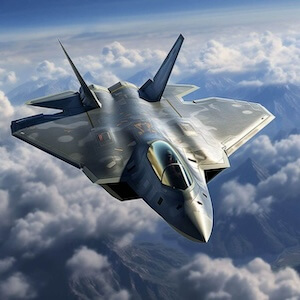
Image Flip
Markdown FansQ「Hope to quickly flip images horizontally or vertically」
VLOOKAT2 Markdown doesn't support image flipping, but now with VLOOK™'s "#Magic" it's easily achievable~
Availability •••
Editing✓ SupportedGnExport HTML✓ SupportedGn
Add VLOOK™ standard image "#Magic" in the "image address" to implement:
Horizontal Flip: Image address +
#fliphVertical Flip: Image address +
#flipv
Image Flipping Example
Image Filter
Markdown FansQ「Hope to add some simple, practical filters to images (e.g. invert, blur, grayscale, vintage)」
VLOOKAT2 Markdown doesn't support image filters, but now with VLOOK™'s "#Magic" it's easily achievable~
Availability •••
Editing✓ SupportedGnExport HTML✓ SupportedGn
tab
Syntax
Add VLOOK™ standard image "#Magic" in the "image address" to implement:
Invert: Image address +
#invertBlur: Image address +
#blurVintage: Image address +
#agedGrayscale: Image address +
#gray
Advanced Usage
If you want filtered images to restore to original when hovered, it's very Easy~
Just add an English exclamation mark
!after the above mentioned "#Magic"~
Note
For the same image, these "#Magic" cannot be used simultaneously
Image Filter Examples
Hover to Restore Original Examples
Image Grid Background
Markdown FansQ「When using engineering or design images, hope to automatically add uniform grids as background」
VLOOKAT2 Through "#Magic", you can add specified grid backgrounds for transparent background images (like PNG, SVG).
Availability •••
Editing✓ SupportedGnExport HTML✓ SupportedGn
Add VLOOK™ standard image "#Magic" in the "image address" to implement:
Image address +
#grid background identifierThis feature automatically adapts to images also using Dark Mode.
Image Grid Background Identifiers and Descriptions
| Grid Background ID | Description | Full Syntax Reference |
|---|---|---|
| line | Add line-style grid background |  |
| block | Add block-style grid background |  |
Line Grid Background Examples
tab


Block Grid Background Examples
tab

Image Edge Padding
Markdown FansQ「My figure have no edge padding, visually looking crowded, how to adjust?」
VLOOKAT2 Through "#Magic" this niche personalized typesetting challenge can be easily handled~
Availability •••
Editing✓ SupportedGnExport HTML✓ SupportedGn
Syntax
Add VLOOK™ standard parameter in "image address" to enable this feature (default adds
20pxpadding to image edges):
Image address +
#padding, example:
Note
If you have questions about "URL parameters, URL anchors", you can learn more at Image Address Extension Usage.


Postcard
Markdown FansQ「Most HTML generated by Markdown is static, can it bring some more modern designs in terms of interactivity?」
VLOOKAT2 With "#Magic"加持, automatic image-text typesetting reaches new heights, monotonous images instantly become lively~
Availability •••
Editing× Not SupportedGyExport HTML✓ SupportedGn
tab
Postcard Syntax
Add VLOOK™ standard image "#Magic" in the "image address" to implement:
When a theme-colored border appears at the bottom of the image, it means it's correctly enabled. After exporting HTML, supports browsing and searching in illustration index.
Tip
If image edges are white or you want images to stand out, you can append
#borderto achieve this
Postcard Title and Body
Standard Markdown image syntax:
Note that card title content comes from "Title text" in the image, while card body content comes from "Alt text" in the image.
Tip
To customize body content formatting, you can add a "blockquote" below the image, whose content will replace "Alt text".
tab
Caution
"Postcard" cannot be used simultaneously with typesetting features in Image Display Layout.
Note
If you have questions about "URL parameters, URL anchors", you can learn more at Image Address Extension Usage.
Adding Postcard to Any Ordinary Image (Single Card) Example

Adding Postcard to Any Ordinary Image (Single Card+Border) Example

Adding Postcard to Any Ordinary Image (Dual Card) Example
Adding Postcard to Any Ordinary Image (Dual Card+Border) Example
Postcard with Blockquote Coloring (Dual Card) Example
Gn
Advanced Usage
If you want to typeset Postcard more neatly in columnsT1T2, just place "Postcard" inside colored blockquotes
If blockquotes specify background colorsT1T2, will adapt for display, same familiar recipe~
After adding
#borderto images, when image width is too small to fill column space, you can additionally add#fillparameter,If image width is small, you can try adding
#fitmaxto image address to make hover-displayed cards wider, see example ❯❯Bk!
Single Card Example with Blockquote Columns
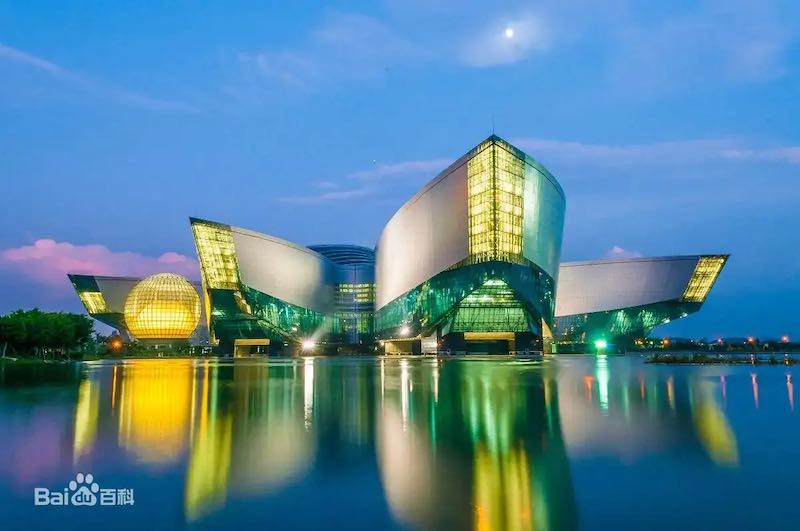
With "Nature, Humanity, Science, Civilization"RdGnSe as its theme, this non-profit public welfare organization serves as a social science activity venue for public science education and a demonstration site for science tourism leisure.
View on Baidu Baike View on Baidu Baike
Guangdong Science Center cost 1.9 billion RMB and took nearly 5 years to build, opening on September 26, 2008.
T1

Mn

Flat Mode Example with Blockquote Columns
With "Nature, Humanity, Science, Civilization"LmOgYe as its theme, this non-profit public welfare organization serves as a social science activity venue for public science education.
View on Baidu Baike View on Baidu Baike
Guangdong Science Center cost 1.9 billion RMB and took nearly 5 years to build, opening on September 26, 2008.
Bu
Peltícanhú (also called gannets or river birds, large swimming birds in the order Pelecaniformes, family Pelecanidae, with broad wings, wide wingspan, powerful flapping), flying over Medicine Lake National Wildlife Refuge in Montana. The bird in the foreground has a horny plate on its beak that grows during mating season and falls off when the season ends.
— Photo: KLAUS NIGGE, NAT GEO IMAGE COLLECTION
Gn
Image HD Screen Adaptation
Markdown FansQ「Images appear blurry on HD screens, but Markdown image syntax doesn't support different resolution image sets, what to do?」
VLOOKAT2 While keeping Markdown image syntax unchanged, easily display HD resolution images on high-resolution screens!
Availability •••
Editing× Not SupportedGyExport HTML✓ SupportedGn
Add VLOOK™ standard parameters in "image address" to enable this feature.
tab
Not Using "Image Hosting"
Syntax Without Image Hosting
srcset=@2x,@3xExample

Using "Image Hosting"
Syntax for using "Image Hosting" (random naming)
srcset=<2x image path>@2x,<3x image path>@3xExample

Note
For high-resolution images in the same directory or URL as standard resolution images, only the filename needs to be written; otherwise, the complete image address must be provided.
If you have questions about "URL parameters, URL anchors", you can learn more at "Image Address Extension Notes".
tab



Image Adaptation for Dark Mode
Markdown FansQ「When the system enables Dark Mode, the images appear somewhat inharmonious. What should I do?」
VLOOKAT2 Supports specifying adaptation methods for images in Dark Mode, currently supporting "invert colors" and "replace" to meet different needs!
Availability •••
Editing× Not SupportedGyExport HTML✓ SupportedGn
Invert Color Adaptation
Particularly suitable for "black/white/gray" type images
Add VLOOK™ standard URL parameters in "image address":
URL parameter:
darksrc=invertYou can now click the
/
/
in the bottom right corner (shortcut D), then observe the changes in the two images below.
Note
If you have questions about "URL parameters, URL anchors", you can learn more at "Image Address Extension Notes".
tab


Replacement Adaptation
In the "image address", add VLOOK™ standardized URL parameters to achieve:
URL parameters:
Normal resolution image:
darksrc=xxx.jpgHigh-definition screen resolution adaptation (optional):
darksrcset=..., the usage of this parameter is consistent withsrcsetfor high-definition screen adaptation, see "Image HD Screen Adaptation"You can now click the bottom right
tab
Important
If high-resolution image resources are large, after switching to Dark Mode, the specified image resources need to be loaded completely before being replaced.
Note
If you have questions about "URL parameters, URL anchors", you can learn more at "Image Address Extension Notes"
tab


Image Silhouette
Markdown FansQ「Hope images in documents can automatically follow the document theme color or text color, without needing to recreate multiple versions of image resources」
VLOOKAT2 Can target transparent background png or svg images, displaying their outlines with specified colors.
Availability •••
Editing✓ SupportedGnExport HTML✓ SupportedGn
In the "image address", add VLOOK™ standardized URL parameters to achieve:
URL parameter:
fill=color identifier
Image Silhouette URL Parameters (fill) Identifiers and Descriptions
| Color Identifier | Description |
|---|---|
| text | Replace with the color of the paragraph text (automatically adapts to Dark Mode and link styles) |
| Color Code | Replace with specified color from Preset Color Code, e.g.: Rd Ye |
Note
Due to Safari browser kernel compatibility issues, the preview during editing in Typora will not show the final effect. The exported HTML will display normally when accessed using recommended browsers.
Image Silhouette Mixed Layout Example
Different content using
textcolor identifier will automatically adapt:Adapt to normal text color:
 Markdown
  is a text markup language specifically for web writing
Adapt to link text color: What is
Markdown ?Adapt to blockquote (colored), GitHub Style Alert colors
Using specified Preset Color Code:
Image Silhouette Specified as Preset Color Code Example
| Color | Color Code | Image Silhouette Effect Example |
|---|---|---|
| Wine Red | WnWn |  Markdown Markdown  icon replaced with specified color icon replaced with specified color |
| Red | RdRd |  Markdown Markdown  icon replaced with specified color icon replaced with specified color |
| Orange | OgOg |  Markdown Markdown  icon replaced with specified color icon replaced with specified color |
| Yellow | YeYe |  Markdown Markdown  icon replaced with specified color icon replaced with specified color |
| Lime Green | LmLm |  Markdown Markdown  icon replaced with specified color icon replaced with specified color |
| Green | GnGn |  Markdown Markdown  icon replaced with specified color icon replaced with specified color |
| Mineral Green | MnMn |  Markdown Markdown  icon replaced with specified color icon replaced with specified color |
| Olive Green | OlOl |  Markdown Markdown  icon replaced with specified color icon replaced with specified color |
| Aqua Green | AqAq |  Markdown Markdown  icon replaced with specified color icon replaced with specified color |
| Cyan | CyCy |  Markdown Markdown  icon replaced with specified color icon replaced with specified color |
| Blue | BuBu |  Markdown Markdown  icon replaced with specified color icon replaced with specified color |
| Sea Blue | SeSe |  Markdown Markdown  icon replaced with specified color icon replaced with specified color |
| Lavender Purple | LaLa |  Markdown Markdown  icon replaced with specified color icon replaced with specified color |
| Vine Purple | VnVn |  Markdown Markdown  icon replaced with specified color icon replaced with specified color |
| Purple | PuPu |  Markdown Markdown  icon replaced with specified color icon replaced with specified color |
| Rose Pink | RoRo |  Markdown Markdown  icon replaced with specified color icon replaced with specified color |
| Pink | PkPk |  Markdown Markdown  icon replaced with specified color icon replaced with specified color |
| Gold | GdGd |  Markdown Markdown  icon replaced with specified color icon replaced with specified color |
| Brown | BnBn |  Markdown Markdown  icon replaced with specified color icon replaced with specified color |
| Gray | GyGy |  Markdown Markdown  icon replaced with specified color icon replaced with specified color |
| Black | BkBk |  Markdown Markdown  icon replaced with specified color icon replaced with specified color |
| Theme Primary Color | T1T1 |  Markdown Markdown  icon replaced with specified color icon replaced with specified color |
| Theme Secondary Color | T2T2 |  Markdown Markdown  icon replaced with specified color icon replaced with specified color |
Blockquote Coloring and Title Example
This is
Markdown's Level 6 Heading
Here is the main content.
Pk
Important
Due to browser cross-origin security policies, for documents using this feature with SVG format images, it is recommended to publish them to an HTTP server, with the image path and HTML path under the same domain (i.e., no cross-origin), e.g.: HTML document published at http://<DomainA>/index.html
✅✅✅ Correct image address example:
http://<DomainA>/img/xxx.svg❌❌❌ Incorrect image address example:
http://<DomainBBB>/img/xxx.svg
Different Opening Methods and Browser Instructions for SVG Images Enabling "Image Silhouette"
Image Address Instructions for Enabling "Image Silhouette"
Browser Directly Open Local HTML File == Access HTML via HTTP == : []Relative Path []URL Path []Relative Path []URL Path Chrome / Edge Y Y Firefox Y Y Y Safari Y
(** Must specify default image host)Y Y Y / == == ⚠️ NoteRd! Image path and HTML path "domain" must be consistent== ** To achieve color replacement for image paths that are relative paths (actually deployed on a specified server or image host), you need to specify the default image host address through Preset Options
vlook-image-host.
GIF Playback Control
Using online videos can be large in size and vulnerable to attacks. Often converted to GIF for suitability, but they automatically play causing unnecessary traffic.
Achieve more friendly interaction and save traffic by implementing click-to-play similar to videos.
In addition to GIF, it's recommended to include a cover image.
Then add #gif after the image address, clicking will play the .gif file with the same name.

Image Comparison
COMMING SOON...
Gy!
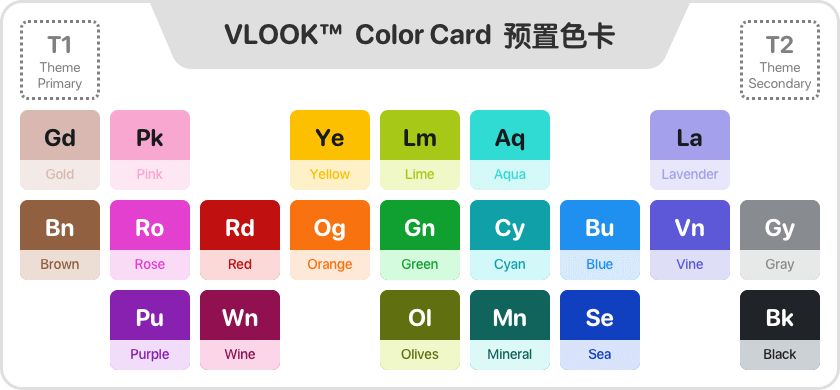
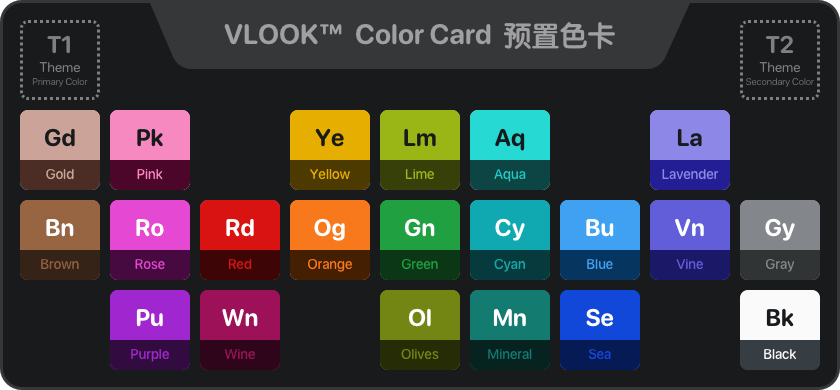
Image Gallery
COMMING SOON...
Gy!
Image Alignment
Availability •••
Editing✓ SupportedGnExport HTML✓ SupportedGn
Image alignment (left, center) is specified by the selected VLOOK™ theme, support custom alignment through Custom Theme Service;
Includes cases where there's only one image in a paragraph, images with links, etc., but excludes icon layout images.
Image Caption & Auto-numbering
About image captions and auto-numbering
For feedback:
°List
List Auto-numbering & Style
In addition to the previously mentioned List Columns, the following enhancements are provided:
Unified processing of bullet symbols for ordered and unordered lists, applying theme colors;
Editing focus and mouse hover in exported HTML both support highlighting current list symbols;
Support personalized symbol styles for first-level ordered lists :
Temporarily not applicable to ordered lists within GitHub Style Alert;
Ordered lists within quotes need preceding content (like blank lines, subtitles, etc.).
Tip
There are currently 7 available styles for first-level ordered lists. For details, see Custom Theme ❯❯
Availability •••
Editing✓ SupportedGnExport HTML✓ SupportedGn
Auto-numbering for Ordered Lists in Blockquotes
Auto-numbering styles for ordered lists:
Force-set symbols for each level, applying theme colors.
Third-level ordered list
Fourth-level ordered list
Fifth-level ordered list
Sixth-level ordered list
Top 20 Ordered List Styles
Top 9 styles
Top 9 styles
Top 9 styles
Top 9 styles
Top 9 styles
Top 9 styles
Top 9 styles
Top 9 styles
Top 9 styles. If content is too long it will auto-wrap, check the indentation after wrapping.
Top 10-19 styles. If content is too long it will auto-wrap, check the indentation after wrapping.
Top 10-19 styles
Top 10-19 styles
Top 10-19 styles
Top 10-19 styles
Top 10-19 styles
Top 10-19 styles
Top 10-19 styles
Top 10-19 styles
Top 10-19 styles
Top 20 styles
T2
Auto-numbering for Unordered Lists in Blockquotes
Auto-numbering styles for unordered lists:
Force-set symbols for each level, applying theme colors.
Third-level unordered list
Fourth-level unordered list
Fifth-level unordered list
Sixth-level unordered list
Gd!
This is auto-numbering style for ordered lists in normal text:
Force-set symbols for each level, applying theme colors.
Third-level ordered list
Fourth-level ordered list
Fifth-level ordered list
Sixth-level ordered list
This is auto-numbering style for unordered lists in normal text:
Force-set symbols for each level, applying theme colors.
Third-level unordered list
Fourth-level unordered list
Tip
The above are partial examples of list styles. For more examples with blockquote coloring, see here ❯❯
List Columns
About column typesetting for lists
Task List Style
Markdown FansQ「The default generated task list style is the browser's standard checkbox style, inconsistent with the theme and enhanced typesetting effects~」
VLOOKAT2 VLOOK™ has made multiple style and detail adaptations for this situation, making the overall to detailed visuals more harmonious and consistent.
Availability •••
Editing× Not SupportedGyExport HTML✓ SupportedGn
Overall task progress: ?
1. Analyze target market demand ?
Survey target customer groups ?
Develop questionnaire or face-to-face interview plan
Collect customer needs and preference information for products/services
Research competitors ?
Analyze competitor products, pricing strategies and market share
Identify competitor strengths/weaknesses and compare with own
2. Collect market data ?
Review industry reports and data ?
Review industry reports and statistics published by industry associations
Collect information on industry trends and development forecasts
Analyze market trends ?
Process market data through analysis tools/software
Identify and explain market trends to guide project decisions
Tip
The above are examples of task list styles in main text. For more examples with blockquote coloring, see here ❯❯
For feedback:
°Blockquotes
Blockquote Subtitle
Markdown FansQ「Want to add a subtitle within a blockquote, but using hierarchical headings directly isn't quite appropriate」
VLOOKAT2 Generally the first paragraph in a blockquote serves as the subtitle, so setting the entire paragraph content as bold or highlighted automatically renders as a "blockquote subtitle" style!
Availability •••
Editing✓ SupportedGnExport HTML✓ SupportedGn
tab
Syntax
Set the first line in a blockquote as "bold" or "highlight".
Also supports adding "icon layout" images before the subtitle in a standalone line for richer typesetting options~
Tip
If you need to bold the entire first/second line within a blockquote but don't want to activate the "subtitle" style, just add a "space" after the bold format **.
Blockquote Subtitle Example
x1> **Here is the subtitle for this blockquote**2> ---3> xxxxx4
5> ==Here is the subtitle for this blockquote==6> ---7> xxxxxExample Effect Below:
Bold-Set Blockquote Subtitle
Other paragraph content 1 within this blockquote
Other paragraph content 2 within this blockquote
Highlight-Set Blockquote Subtitle
Other paragraph content 1 within this blockquote
Other paragraph content 2 within this blockquote
For more subtitle styles, see Blockquote Coloring ❯❯
Blockquote Columns
About blockquote column typesetting
Blockquote Coloring
Markdown FansQ「Hope to create banners or boards in Markdown documents to write important things~」
VLOOKAT2 VLOOK™'s Preset Color Code come into play again, same formula, same super usability! Meets practical multi-color "blockquote" typesetting needs!
Availability •••
Editing× Not SupportedGyExport HTML✓ SupportedGn
tab
Syntax
Add corresponding color code
_~Color Code~_in a standalone line within the blockquote (recommended in the last line), e.g.:_~Rd~_Where:
Color Codespecifies the Preset Color Code used for this blockquote. When correctly recognized, a blockquote coloring marker will appear before the color code.
Default is "Outline" style;
To specify as "Color Block" style, use "Emphasized" predefined color codes (add English exclamation mark "!" after
Color Code, e.g.:_~Rd!~_).
Tip
All unspecified ordinary blockquotes (normal paragraphs, excluding blockquotes within lists or other blockquotes) will be automatically converted to blockquotes with color code T1!.
To modify the default color code or disable automatic conversion, specify through "Plugin Tuning Parameters" quote.
Normal Blockquote
More Information
This is a task list item
This is an unordered list item
This is an ordered list item
Color Code
WnLearnColor Code ℹ️ Main ButtonSecondary Button
More Information
This is a task list item
This is an unordered list item
This is an ordered list item
Wn

[... Additional blockquote coloring examples continue in same pattern ...]
Blockquote Folding
Markdown FansQ「When writing Markdown documents, for some long blockquote content, hope it can exist in folded form by default, and click to open when needed.」
VLOOKAT2 By extending the writing method of Markdown blockquotes >, achieves dynamic folding/unfolding of blockquote content!
Availability •••
Editing✓ SupportedGnExport HTML✓ SupportedGn
Syntax:
> ###### title, which means setting a level-6 heading as the first line content of a standard blockquote, serving as the title displayed when collapsed.Where:
title: The title corresponding to the collapsed content. After being correctly recognized, a collapse indicator will appear before the level-6 heading, and the content will be automatically collapsed. Clicking it will expand the content for viewing and editing. The same interactive behavior will also be preserved after exporting to HTML.(When using this syntax, all content inside the blockquote except the title will become the collapsed section.)
Practical Application Example
What is Syllogism?
Syllogism is a simple deductive reasoning in logic. It contains:
Major PremiseA general principle
Minor PremiseA specific statement subordinate to the major premise
ConclusionT2! The derived specialized statement conforms to the general principle's conclusion
What is the MECE Principle?
MECE[[me_see]] analysis stands for Mutually Exclusive Collectively Exhaustive, meaning "no overlaps, no gaps" in Chinese.
Here are five classification methods of MECE:
Dichotomy
Dichotomy is common in daily life, essentially dividing things into A and non-A parts, such as "day/night", "male/female", "domestic/foreign", "internal/external", etc.
Process Method
The process method breaks down procedures according to their timeline, processes, or sequences.
Example
The production of cloisonné can be divided into seven steps: base making, wire inlaying, firing, enamel filling, enamel firing, polishing, and gilding.
Element Method
The element method is mainly used when things consist of certain components, dividing a whole into different parts; however, when decomposing elements, maintain dimensional consistency to avoid overlaps or gaps.
Example
A library can be divided by floor dimension: first floor, second floor, third floor; or by functional areas: information service area, collection area, reading area, public activity area, office area; but cannot mix floor and functional area dimensions, otherwise it violates the MECE principle.
Formula Method
The formula method classifies elements according to designed formulas. If the formula holds, then the element classification complies with MECE.
For example:
GMV = Traffic × Average Order ValueMatrix Method
The matrix method classifies or divides things using a two-dimensional matrix, such as the common urgent/important classification in time management: urgent and important, urgent but not important, not urgent but important, not urgent nor important.
Example Markdown Source Content
xxxxxxxxxx71> ###### What is Syllogism?2>3> Syllogism is a simple deductive reasoning in logic. It contains:4> 5> - **Major Premise**: A general principle6> - **Minor Premise**: A specific statement subordinate to the major premise7> - **Conclusion**: The specific conclusion derived from the premises that conforms to the general principleBlockquote Typesetting Subdivision
Availability •••
Editing✓ SupportedGnExport HTML✓ SupportedGn
Example of Nested Blockquotes in Blockquotes
The style of normal blockquotes nested within blockquotes will automatically adjust to a "minimalist" style, as follows:
This is a normal blockquote nested within a blockquote
The style of normal blockquotes nested within blockquotes will automatically adjust to a "minimalist" style, as follows:
This is a collapsible blockquote nested within a blockquote
Collapsed content
Example of Column Blockquotes Nested in Blockquotes
The style of "blockquote columns" nested within blockquotes will automatically adjust to a "prominent" style, as follows:
This is "blockquote column" 1 nested within a blockquote
This is "blockquote column" 2 nested within a blockquote
Example of Blockquotes Nested in Lists
Normal blockquotes nested within unordered or ordered lists will adjust to a "self-adapting width" style and won't be converted by default (see
quotein Plugin Tuning Parameters), as follows: Normal Blockquote
This is content of a normal blockquote
"Blockquote coloring" nested within unordered or ordered lists will adjust to a "self-adapting width" style, as follows:
Blockquote ColoringThis is a blockquote coloring
theme secondary colorT2, color codeT2Learn aboutcolor codesℹ️T2
For feedback:
°Chapter Headings
Heading Style
VLOOK™'s Built-in Themes provide rich choices for document headings, along with various automatic numbering formats
For more personalized heading styles (e.g., colors, gradients, borders, padding, etc.) or custom automatic numbering formats, you can subscribe to Custom Theme Services .
Note
When using a theme with gradient-colored headings, emojis in the heading will also be force-rendered with the gradient.
To fix this, simply make the emoji "bold".
Automatic Heading Numbering
Markdown FansQ「Hope to customize automatic heading numbering in documents to adapt to specific document styles and heading content organization」
VLOOKAT2 VLOOK™ provides very practical and personalized heading numbering format options that can easily meet the personalized requirements of different documents for heading numbering formats.
Availability •••
Editing✓ SupportedGnExport HTML✓ SupportedGn
After using the VLOOK™ plugin, it supports automatic numbering of chapter headings in documents by default. The default automatic numbering format is Arabic numerals, such as 1. Chapter Heading 3.2.5 Chapter Heading.
All VLOOK™ themes automatically apply hierarchical numbering to
Level 1 ~ 5headings;Because
Level 6headings are used in VLOOK™ for Front and Back Covers, paragraph subheadings, etc., they are not within the automatic numbering range.
You can specify through "Plugin Preset Options" vlook-header-autonum to take effect after exporting HTML. The formatting examples are as follows:
Custom Heading Automatic Numbering Format Examples
xxxxxxxxxx31---2vlook-header-autonumLevel1Prefix#Format#Suffix,Level2Prefix#Format#Suffix,...,Level5Prefix#Format#Suffix3---tab
Tip
If the VLOOK theme does not include automatic numbering styles, this parameter can also be used to forcibly specify enabling automatic numbering and corresponding formats after exporting HTML.
Note
For more information about setting plugin preset options through YAML Front Matter, see Plugin Preset Options
Options Explanation for Custom Title Auto-numbering Format
| Numbering Option | Values | Description | Option Reference | Effect Preview |
|---|---|---|---|---|
| Level | h1 ~ h5 | Represents level 1 to level 5 headings | h3{{###}} | 1.2.3 xxxxx |
| Prefix | Any text content | Such as: 第, Chapter | h1{{Chapter ###.}} | Chapter 5. xxxxx |
| Format | none | Disable auto-numbering | h2{{#none#}} | xxxxx |
| : | # | Arabic numerals. E.g.: 1, 2, 3, 4, 5 | h2{{Chapter ###}} | Chapter 3.2 xxxxx |
| : | zh | Chinese numerals. E.g.: 一、二、三、四、五NoteRd Effective for h1 only | h1{{第#zh#章}} | 第一章 xxxxx |
| : | ZH | Chinese uppercase numerals. E.g.: 壹、贰、叁、肆、伍NoteRd Effective for h1 only | h1{{第 #ZH# 回}} | 第 伍 回 xxxxx |
| : | alpha | Lowercase English letters. E.g.: a, b, c, d, ENoteRd Effective for h1 or -min only | h2{{#alpha#}} | a xxxxx |
| : | ALPHA | Uppercase English letters. E.g.: A, B, C, D, ENoteRd Effective for h1 or -min only | h2{{#ALPHA#}} | A xxxxx |
| : | roman | Lowercase Roman numerals. E.g.: i, ii, iii, iv, vNoteRd Effective for h1 or -min only | h3{{#roman# •}} | i • xxxxx |
| : | ROMAN | Uppercase Roman numerals. E.g.: I, II, III, IV, VNoteRd Effective for h1 or -min only | h3{{#ROMAN#} | IV • xxxxx |
| Extension | 00000... | Fixed-length placeholder, left-padded with zeros if insufficient | h1{{Chapter #00## /}} | Chapter 002 / xxxxx |
| : | -min | Display numbering in single-level modeNoteRd Mutually exclusive with -sup | h3{{步骤 #0#-min# -}} | 步骤 01 - xxxxx |
| : | -sup | Display numbering in dual-level modeNoteRd Mutually exclusive with -min | h2{{附录 #ALPHA-min#.}},h3{{#00#-sup# -}} | Level 2: 附录 A - xxx Level 3: 附录 A.01 - xxx |
| Suffix | Any text content | Such as: 章, . | h1{{#zh#、}} | 1)xxxxx |
For more personalized heading styles (e.g., colors, gradients, borders, padding, etc.) or custom automatic numbering formats, you can subscribe to Custom Theme Services .
This is a level 2 heading example
(Content)
This is a level 3 heading example
(Content)
This is a level 4 heading example
(Content)
This is a level 5 heading example
(Content)
This is a level 6 heading example
(Content)